Home
Support DVDx and freeware tools renew for 1 year your VIP Pass for $29.90 (19.90€) or 2 years for $49.90 - Click here to renew
Registered VIP members: 12014
[20h04: 1614 visitors - 6 VIP in]

The May 2008 newsletter in available online »»

Digital Video headlines

- Toshiba to give HD-DVD and Blu-ray to win the war ?
- New Plextor Blu-ray Rewriter & HD DVD-ROM drive
- New TViX HD M-6500A
- CUDA for Mac OS X is available
- New DVDx InfoTool is out!
- DVDx Project Relaunched: SVN at Source-Forge
- Nero 8 is out!
- Roxio launches Easy Media Creator 10
- Sony announced Vegas Pro 8
- Nero 8 Ultra Edition coming soon
- AMD's 3GHz K10 to break 30,000 3DMark06
- Toshiba announced its third generation of HD DVD players

 
Check all news headlines »»   Browse our software database »»

DVDx 3 First Experiment (for Vista Users)

Community Awards Starbuck has uploaded a very first build DVDx 3.0 called First Experiment which should solve a lot of issues running on Windows Vista.

This release provides better reliability on Windows Vista, fixing most crashes.

DVDx 3.0 First ExperimentWhat’s in this DVDx 3.0 First Experiment:
  • GUI: removed all skin stuff for better reliability on multiple monitors PC and Windows Vista
  • Code: GPL'd libraries are re-organized for better readability, reliability and openness, providing more ease and happiness to developers in order to provide a better software to users
  • The Debug works and can help to understand DVD I/O issues.
  • Code compilation hasn't been optimized at all so it might be slower than DVDx 2.10 release, but WMV encoding is as fast (45fps). A new optimized build will be available soon (92fps vs 34fps for Xvid encoding).
  • It has been tested on Vista Ultimate 32-bits SP 1: successful to encode all formats (AVI, VCD, SVCD, WMV).

DVDx InfoTool : a new companion for DVDx

DVDx InfoToolStarbuck has released a very first pre-version of DVDx InfoTool which displays DVD-Video IFO data and Title data in a window (code from ifo_dump in libdvdread) running on Windows, Mac OS.X and Linux!

Thus it's our brand new contribution from labDV to open-source community, preceding a lot more!

What’s in this DVDx InfoTool pre-release:
  • Video attributes of VTSM_VOBS
  • All PGC
  • Playback time
  • Prohibited user operations
  • Program Entry Cell
  • STC_discontinuty
  • Time Search table (VTS_TMAPS)
  • Menu Cell Address table
  • VTS VOBU address map

New DVDx 2.10: shutdown count-down, WMV volume splitting and chaptering

DVDx 2.10 Ultra EditionWe've published the new DVDx 2.10 release, available on labDV server, on DVDx web site and on SourceForge servers.

We've added a count-down at computer shutdown when job is finished, we've completed WMV support by developing the volume splitting and the encoding by chapters. New WMV widescreen profiles for Archos Generation 4 (Archos 604 at 480x272 on 4.3" wide screen and Archos 404 at 320x240 on 3.5" screen) have be added. Shutdown can now be toggled while encoding, thru the settings menu.

What's new in 2.10

Shutdown computer when job is done:

  • added this option in Settings menu so it can be changed during encoding
  • added a count-down dialog that allows the user to cancel within 30 seconds
  • added a checkbox option to get a shutdown count-down silent or beeping

Input settings dialog window:

  • a little enlarged vertically for more readability and to add the new option to get a silent or beeping shutdown count-down

WMV encoding:

  • added volume splitting feature (which wasn't done yet for WMV format)
  • fixed encoding by chapter feature (each volume was limited to 5 seconds)
  • added new widescreen profiles for Archos Generation 4
  • added more explicit error messages when begin writing the WMV output file

AVI codec settings:

  • fixed the 'wrong settings block for AVI video codec' warning message on DivX 2-pass encoding
  • headers file added in AVI_LIB from Xvid 1.1.3 vfw module: config.h, xvid.h and vfwext.h
  • change output estimation for Xvid

Multilanguages:

  • added some menu items in language files: Preview aspect, 4/3, 16/9, Free, Shutdown when finished
  • modified RefreshLanguage() method of main window (CMpeg_encodeDlg)

Download:

  • DVDx standard version "ripper free" (and sources) available from Source Forge
  • DVDx Ultra Edition (and all versions and sources) available from labDV.com for VIP members only.

The DVDx tutorials

Two new tutorials have been published in the Marc and May newsletters, they've been completed and partly rewritten before being published in labDV guides:

DVDx starter guide:

New DVDx users frequently ask how to use DVDx for the first time and quickly encode a DVD movie on their PC.

So this guide is for the very beginners, you just have to follow on step by step instructions and screenshots.

The first part is to copy a DVD to a DivX movie, because most of you burn DivX movies. The other parts just differ by the Output settings which are defined to output different formats: VCD, SVCD and WMV.

DVDx splitting guide:

This has been asked several times in the DVDx forum, how to copy only a part of the movie ?

So this guide explains how to split a movie with DVDx in a simple manner, you just have to follow on step by step instructions and screenshots.

The first part is to copy some chapters in separate files, the simplest splitting option offered by DVDx. The two other parts explain the other splitting options offered by DVDx: split several chapters in several volumes (say in several files) or extract a part of the movie defined from the timeline preview.

DVDx : the most complete DVD ripping solution ever !

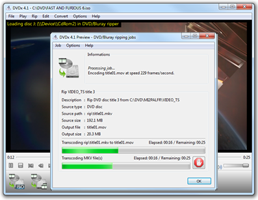
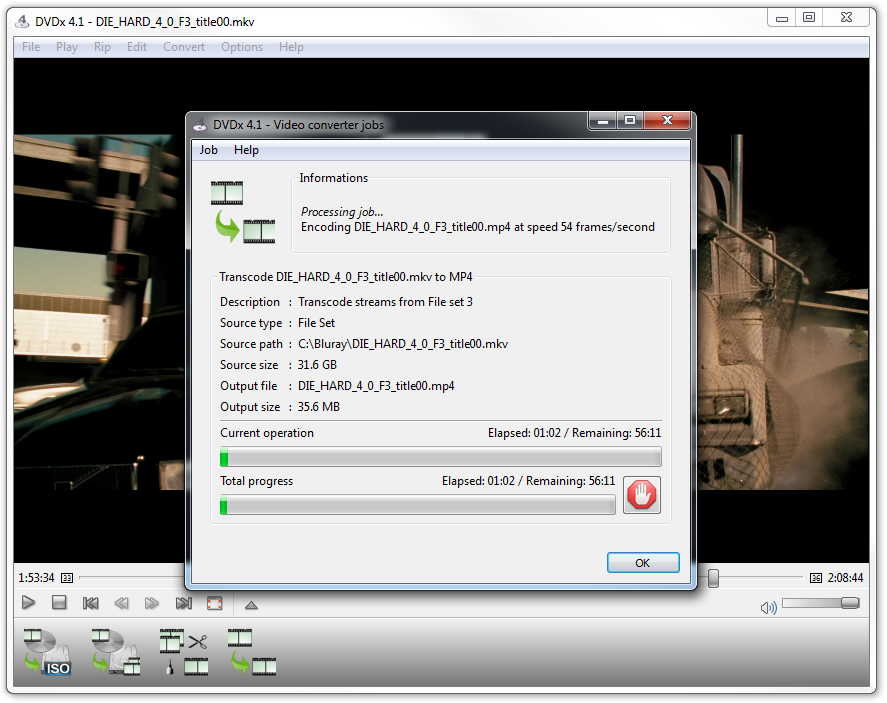
DVDx in action!What can DVDx do ?

  • DVDx copies DVD movie to VCD, SVCD, DivX, AVI or WMV in one step.
  • DVDx has been designed as a simple and intuitive program especially for unexperimented users.
  • DVDx produces high quality MPEG and AVI movies and advanced features provides smart settings for experimented users.

Why DVDx is the fastest DVD backup solution out there ?

  • DVDx is likely the fastest solution ever to copy a DVD into a DivX file because the DVD reading (and decrypting) is done while encoding to DivX.
  • Alternative solutions require to copy the DVD to the hard drive with DVD Decrypter (or SmartRipper or any other DVD ripping software) which takes about 30 minutes, and then the encoding time is added. So with a 75FPS encoding speed for a 1:30 PAL (25FPS) movie, the total ripping time of alternative software is 1 hour. While DVDx will take less than 32 minutes (at 72FPS).
  • We encourage you to upgrade your DivX codec to latest version which takes benefit from latest compiler enhancement for new Intel/AMD processors. On a $1,000 consumer HP Pavilion with a Intel Pentium 830D, the encoding DVDx frame rate is 72FPS with DivX Pro 6.1.1 and later.
  • To encode to MPEG VCD/SVCD with the internal encoder or to encode to Windows Media, DVDx is also the fastest solution for the same reason.

Thanks to the "ripper free" version, now DVDx can comply with any country DMCA (or DRM) regulation and can continue to live with full decrypting support in authorized countries.

DVDx standard version is available from Source Forge and DVDx Ultra Edition is available from labDV.com for VIP users.

DVD Shrink 3.2 a smart toy!

With DVD Shrink, you can recompress a large DVD movie into a reasonable size to fit in a 4.7GB recordable DVD. It's very fast and pretty good quality, a good solution to backup your preferred movies keeping parts of menus and bonuses. The latest DVD Shrink 3.2.0.15 is available in labDV software downloads:

  • Added Quality Settings tab in the backup dialog, with option to enable AEC "adaptive error compensation" algorithms.
  • Updated to NeroSDK 1.05, which includes support for burning DVD-9 dual-layer media. Added DVD-9 target size in preferences window.
  • Removed "burn with DVD Decrypter" checkbox and replaced with a selectable backup target.
  • Added burn with CopyToDVD as a backup target, this appears if CopyToDVD is installed.
  • Added automatic support for splitting ISO files if they are saved to a FAT32 partition.
  • Added support for replacing a title with a custom image. A default image from Guy Incognito is installed.
  • Added "InstallPath", "InstallApp" and "InstallHelp" keys to the DVD Shrink registry.
  • Added "March by ZeF69" toolbar.
  • Fixed bug where Panscan and Letterbox subpicture streams could be erroneously discarded in some circumstances.
  • Fixed bug if volume label exceeded 32 characters.

Current labDV guide for DVD Shrink isn't obsolete and may be helpful.

Guide: TMPGenc DVD Author

Pegasys, well known for their MPEG encoding software TMPGEnc, tries now DVD authoring with TMPGenc DVD Author v 1.5 (TDA).

DVD Authoring is very easy with TMPGEnc DVD Author.

Create your own DVD's with motion menus in only a few minutes following our guide, in french.

Welcome to labDV !

Founded in April 2001, labDV is publishing valuable information to Digital Video enthusiasts as well as beginners. This exciting project has helped to build a team on benevolent contributors who continuously publish new articles, new reviews and new guides (all reachable from the left navigation tree).

Most of our helpful documents are available from the library index.

We have setup one of the most relevant software database, including DivX and MPEG encoders as well as authoring tools, DVD rippers, codecs and more (see the software database). Registered VIP members can download the software from labDV servers, which are very fast, providing more than 1,024Kbits/sec per user.

Thanks to revenues from the VIP subscription we've sponsored and hosted several open source projects such as the world most popular DVD ripper DVDx.

We're also hosting:

  • Leon's Lab, personal Leon's pages with analog capture and SVCD techniques,
  • Sefy's DVD Backup Guide, a lot of guides and help ripping DVD with different tools,
  • VCDwizard, a cool freeware (VCD-Imager GUI) to make (S)VCD with play-back control (chapters).

Interface en français...
Login


[ register | I forgot my pass ]
Newsletter


Subscribe
Unsubscribe
Philanthropy
Logo LA VIE D'ABORD
Non-profit association to help people and their families facing cancer.
labDV recommends Firefox
Get Firefox
labDV is a trademark of BPF Sarl (France) - Copyright reserved © 2002-2008